REVIEW · VENICE
Venezia Audioguide – TravelMate app for your smartphone
Book on GetYourGuide →Operated by MyWoWo Srl · Bookable on GetYourGuide
Venice is better when you can move on your terms. This TravelMate audioguide lets you explore Venezia solo with professionally made audio on your phone, no paper tickets to chase. I like the total autonomy angle most. You can start wherever you want and replay as often as you like.
My second favorite thing is the amount of material: 85 audio stops totaling about 255 minutes. You can listen online or offline, and you can even read the text inside the app when you want to slow down. One caution: some of the content may include questionable numbers, so treat a few stats as a helpful guide, not a lab report.
In This Review
- Quick reasons this Venice audio guide works
- Price and value: what $6 actually buys you
- Getting started in Venice: activation code and instant setup
- How the app fits real Venice pacing (and why that matters)
- What’s inside: 85 audio stops across Venice
- St. Mark’s area: the fast way to get oriented
- Grand Canal moments: listen while you can actually see
- Rialto Bridge: the perfect anchor stop
- Art and museums: choose your tempo between galleries
- The Scuole (schools) and Venetian neighborhoods: listen for stories
- The Ghetto: a thoughtful listen in a high-impact area
- Murano: a separate mood, best as a day-planning tool
- Languages, text mode, and the small features that actually help
- Accessibility: wheelchair accessible in the audio guide sense
- The main drawback to factor in: possible numeric inaccuracies
- Who should book this Venice audio guide
- Should you book this TravelMate Venice audioguide?
Quick reasons this Venice audio guide works

- No meeting point: download and start right away, anywhere you prefer.
- 85 tracks / 255 minutes: enough depth for a real wander, not just a quick highlight reel.
- Offline or online: keep listening even if your signal gets flaky between canals.
- Text + audio: if you prefer reading for a minute, you can.
- Smart learning add-on: there’s a quiz section with short questions.
Price and value: what $6 actually buys you

At about $6 per person, this isn’t priced like a tour you have to commit to for one fixed time slot. What you’re really paying for is a portable “local guide brain” you control: you choose your route, your pace, and how long you stay at each stop.
The value gets even better because the audio doesn’t feel like a one-and-done product. It’s valid for 1095.5 days from first activation, so you’re not pressured to cram everything into one afternoon. If you return to Venice later, you still have the same guide ready. And since there are 85 audio content items for about 255 minutes, you can stitch together a half-day, full-day, or even multiple visits without the guide running out too fast.
Also, you’re not adding cost for printed materials or a third-party device. Since it’s on your phone, you avoid the usual “where are the headphones?” moment.
You can also read our reviews of more tours and experiences in Venice



Getting started in Venice: activation code and instant setup
There’s no meeting point, so your “start time” is basically when you finish downloading the app.
You’ll need an activation code found in your email or inside the GetYourGuide app:
- Open the email and tap Show activity details or Show your tickets here.
- Tap the big barcode in the orange frame to open the barcode window.
- The 10-digit activation code sits just under the barcode.
For the app itself:
- On Android, search the Play Store for TRAVELMATE.
- On iOS, search the App Store for TRAVELMATE TM.
Once you’ve entered the code, you can start listening immediately—no waiting around, no coordination with a group. This matters a lot in Venice, where walking paths and canal crossings can change your plan in seconds.
How the app fits real Venice pacing (and why that matters)

Venice is a place where you’ll often stop because something grabs your attention: a church facade, a quiet square, a view down the Grand Canal, or a bridge moment that feels perfect at the right angle. A guided tour with a strict schedule can fight that.
This guide doesn’t fight you. It’s built for autonomy:
- You can listen as many times as you want.
- You can switch between audio and text inside the app.
- You can choose online or offline listening depending on your connection.
I also like that the audio is designed to feel like you have a companion guide at your shoulder, covering history, points of interest, and curiosities. The content is said to be created by high-level authors and interpreted by professionals from television and radio, which is exactly what you want for long walking days. Clear narration helps you keep moving without straining to hear every word.
One practical tip: use earphones. Venice can be loud in busy areas, and you’ll get more from the guide if the audio stays consistent.
What’s inside: 85 audio stops across Venice

The app includes Venice introduction and a segment on local cuisine wonders, plus a set of major sights and neighborhoods. Think of it as a menu—you don’t need to do everything in one go.
Here’s how I’d build a logical day from the included stops, with what you should expect from each type of place and when it’s worth listening.
St. Mark’s area: the fast way to get oriented
Start with the app’s Venice introduction, then move into St. Mark’s and the story-connected cluster around it. This is where audio helps most because landmarks are close enough that you’ll naturally compare what you see with what you’re hearing.
As you walk, the guide’s segments include:
- St. Mark’s
- Doge’s Palace
- Marciana Library
- Cà Rezzonico (often better later depending on your route)
- Grand Canal as a “big-picture” listen while you look at scale
For me, the win here is learning the city’s logic. Venice can feel like you’re walking through art and architecture made of water and stone. Listening while you’re right there helps you keep track of where you are and why each place matters.
Note on accuracy: one piece of feedback flagged questionable numbers, including a specific example about the number of steps to a tower at St. Mark’s Basilica. So if the guide gives a measurement or count you’re likely to verify on-site, use that information as a starting point—and still trust your feet for what you see.





Grand Canal moments: listen while you can actually see
The app includes a dedicated Grand Canal segment. That’s smart because this view is less about one building and more about perspective. You’ll get more from this audio when you stop long enough to take in the canal’s line, the feeling of distance, and the way the city opens up.
When to use it:
- When you’re pausing at a major bridge viewpoint, or
- When you’re near Rialto Bridge and can look both directions
Pairing the Grand Canal audio with Rialto Bridge gives you an instant “where am I in the city’s main spine” feeling.
Rialto Bridge: the perfect anchor stop
The app lists Rialto Bridge as its own audio content. That makes sense because Rialto is both a landmark and a natural gathering point. You’ll usually be surrounded by motion—people moving, shops changing, and canal activity that makes the area feel alive.
I’d use this segment as a grounding listen: play it as you’re approaching, so when you reach the bridge you already understand what you’re looking at. Then let the rest of the walk follow your curiosity.
Art and museums: choose your tempo between galleries
The audio guide includes multiple art stops, and this is where the app shines for people who want context without buying a separate guidebook.
Included highlights in this category:
- Accademia Gallery
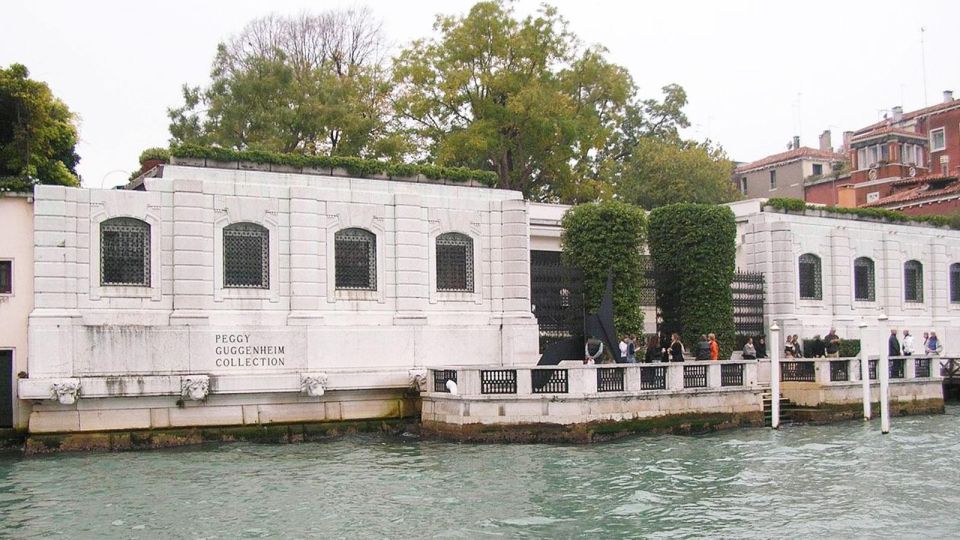
- Guggenheim
- Correr Museum
- La Fenice Theater
- Biennale
- Arsenal
- Basilica of the Friars
- San Sebastiano
- San Zanipolo
- San Zanipolo is listed explicitly, so you’ll find its own track rather than lumping churches into one generic segment
How to use these wisely: pick fewer items and spend longer. Venice museums and churches can stack up quickly. With audio, you don’t need to rush to finish every track—you just need to match the track to your energy.
If you’re a museum person, you can start with a gallery track and then transition into theater or church segments on the edges of your route. If you’re more of a wanderer, treat the art tracks as “stop and listen” experiences, even if you’re not going inside every time.
The Scuole (schools) and Venetian neighborhoods: listen for stories
This app includes several scuole:
- Scuola Di S. Giorgio Degli Schiavoni
- Scuola Grande Di San Rocco
And it also includes cultural-adjacent points like:
- Cà D’Oro
- Cà D’Oro and Cà Rezzonico give you the chance to focus on Venetian palaces as audio-led stops, not just photo backdrops.
- The Ghetto
This is a great part of using the audio guide well: you get to listen at the right pace without crowds pushing you along. You can step into a quieter moment, press play, and let the narration connect the street-level details to broader city stories.
The Ghetto: a thoughtful listen in a high-impact area
The Ghetto has its own audio segment. I’d treat this track with respect: set your pace a little slower than your average walking speed.
Because this area carries strong historical weight, audio can help you move through it with better awareness. Just remember the earlier caution about numeric accuracy mentioned in feedback. If the audio gives a hard fact you want to double-check, use what you hear as guidance, not final word.
Murano: a separate mood, best as a day-planning tool
The app includes Murano as well. While you decide how you’ll reach it, the audio track gives you a reason to go beyond a quick look. Use it as your “why am I here” checklist.
And because this guide supports offline listening, Murano is a practical use case: once you download for the day, you can keep listening without worrying about connection as you move around.
Languages, text mode, and the small features that actually help

This audio guide is available in multiple languages: Chinese, English, French, German, Italian, Russian, Spanish. That matters if you’re traveling with someone whose English is fine for small talk but not for details. Everyone can use the app comfortably without switching to a different system.
The ability to read the text of the audio files is underrated. In Venice, sometimes you’ll want to:
- skim a detail quickly before moving,
- reread a name you didn’t catch,
- or switch to text when you’re standing somewhere too noisy for audio.
Also, there’s a quiz section with short questions. It’s not a game-changer for everyone, but it can help you retain what you just listened to—especially if you’re the type who remembers better after a small test.
Accessibility: wheelchair accessible in the audio guide sense

The activity is listed as wheelchair accessible. Since this is an audio experience and not a single fixed entry point, that generally means you can adapt listening stops to what works for your mobility needs. You still need to plan your walking routes, but the guide itself won’t force you into one rigid path.
The main drawback to factor in: possible numeric inaccuracies

The strongest negative signal is about accuracy of numbers in some parts of the content. One example given was a claim that you must climb 36 steps to reach the tower of St. Mark’s Basilica, which understandably makes people doubt other figures.
So how should you use the guide if you’re cautious? Treat it like a storyteller and orientation tool:
- Use it for names, connections, and what to look for.
- Be flexible with exact counts and measurements.
- If you notice a number that seems off, you’ll still be fine—because the value here is your experience, not passing a trivia exam.
To be clear, the feedback also described the writing as entertaining and useful for getting a basic idea. That’s consistent with why you might love it even if you occasionally roll your eyes at a stat.
Who should book this Venice audio guide

This is a great fit if you:
- want structure without a schedule
- prefer your own route over a group plan
- like learning in small bursts while walking
- don’t want to carry paper tickets or rely on someone else’s pace
- want a multilingual guide that works on your own phone
It’s less ideal if you:
- need strict, engineering-level accuracy for every number
- want a live human guide answering questions in real time
- only have a short window and prefer a curated “do these 5 stops in 2 hours” plan (audio can still do this, but you’ll need to choose your stops)
Should you book this TravelMate Venice audioguide?

If you like the idea of roaming Venice at your speed and you want an easy way to get context for major sights—this is an easy yes. For $6, getting 255 minutes of professionally produced narration plus offline capability and text mode is genuinely practical.
I’d book it if you’re planning to spend time around St. Mark’s, the Doge’s Palace area, the Grand Canal viewpoints near Rialto Bridge, and at least one of the arts or neighborhood segments like Biennale, Guggenheim, Scuola Grande di San Rocco, or The Ghetto.
Go in with one mindset: enjoy the guide for orientation and storytelling, not for verifying every figure. If that sounds like your style, you’ll get good value from this app quickly.